Tech Gaming Hardware discussion (& Hardware Sales) thread

DLSS is so legit.

Just tried Control on the 3070FE.

4K Ultra details and max RT I have 45-50fps and the game looks phenomenal. Apart from one moment where a painting on the wall was blurry for a couple of seconds I haven't noticed any issues with the upscaling.
 
DLSS is so legit.

Just tried Control on the 3070FE.

4K Ultra details and max RT I have 45-50fps and the game looks phenomenal. Apart from one moment where a painting on the wall was blurry for a couple of seconds I haven't noticed any issues with the upscaling.

this was going to be my first game with my 3080 but cyberpunk is to close to release now.

I need a new case anyways 3080 is just to big for my current setup. Picking up a new one at micro center tomorrow.
 
this was going to be my first game with my 3080 but cyberpunk is to close to release now.

I need a new case anyways 3080 is just to big for my current setup. Picking up a new one at micro center tomorrow.

What case are you getting?
 
I need a new case anyways 3080 is just to big for my current setup. Picking up a new one at micro center tomorrow.

micro center ftw.

and i just noticed that my local one has ryzen 5600x/5800x in stock and i'm suddenly debating building a new nerdbox.
 
@Madmick I'm going to take a chance and ask you if you know a bit about TVs.

Just bought a new TV and it seems to have a pretty bad case of dirty screen, banding. From an angle at least. Not noticeable when watching a movie or when there's something happening on the screen but it's quite noticeable at an angle on a plain white or grey background.

Q8pGTjx.jpg


Looks alright when looking at it straight on.

Joynqzs.jpg


I did hear some people say you get panel lottery when buying a TCL. Is this typical? Not sure if I should go through the hassle of sending it back if I could land on something even worse.

TCL 5 Series/S535 2020 QLED
 
Last edited:
Banding aside, I didn't realize just how bad the viewing angles would be on this TV. As soon as you look at it from an angle, the quality of the image drops drastically. Which seems to be the case for most TVs with a VA panel.

I used to have a regular LED TV that I believe had an IPS panel. There really wasn't that much of a difference in image quality viewing it at an angle. The image quality on this one is nicer. The blacks are blacker. But you really have to be looking at it staight on. As soon as you start moving to one side or the other there's a huge drop in quality. Quite a big comprimise for a slightly better image quality.
 
What case are you getting?

going went the thermaltake core v21. I used to have it before I went mini itx but I gave it to my nephew. Back on micro now though and it seems like the best option. I like cube cases in general. I was just in a rush when I got my current case.
 
micro center ftw.

and i just noticed that my local one has ryzen 5600x/5800x in stock and i'm suddenly debating building a new nerdbox.
Are they in store only so bots can't buy them up? That's what my MC does.

And now MC's site is down.

<26>
 
@Madmick I'm going to take a chance and ask you if you know a bit about TVs.

Just bought a new TV and it seems to have a pretty bad case of dirty screen, banding. From an angle at least. Not noticeable when watching a movie or when there's something happening on the screen but it's quite noticeable at an angle on a plain white or grey background.

Q8pGTjx.jpg


Looks alright when looking at it straight on.

Joynqzs.jpg


I did hear some people say you get panel lottery when buying a TCL. Is this typical? Not sure if I should go through the hassle of sending it back if I could land on something even worse.

TCL 5 Series/S535 2020 QLED
Sorry to hear that TCL sells tons of sets they should replace it.
 
going went the thermaltake core v21. I used to have it before I went mini itx but I gave it to my nephew. Back on micro now though and it seems like the best option. I like cube cases in general. I was just in a rush when I got my current case.
You can fit a full size GPU in that microwave?
 
So my Microcenter has 22 5800Xs in stock. Only 2 5600Xs though.
 
@Madmick I'm going to take a chance and ask you if you know a bit about TVs.

Just bought a new TV and it seems to have a pretty bad case of dirty screen, banding. From an angle at least. Not noticeable when watching a movie or when there's something happening on the screen but it's quite noticeable at an angle on a plain white or grey background.

Q8pGTjx.jpg


Looks alright when looking at it straight on.

Joynqzs.jpg


I did hear some people say you get panel lottery when buying a TCL. Is this typical? Not sure if I should go through the hassle of sending it back if I could land on something even worse.

TCL 5 Series/S535 2020 QLED
Definitely doesn't look normal to me. I'd file a warranty claim.
 
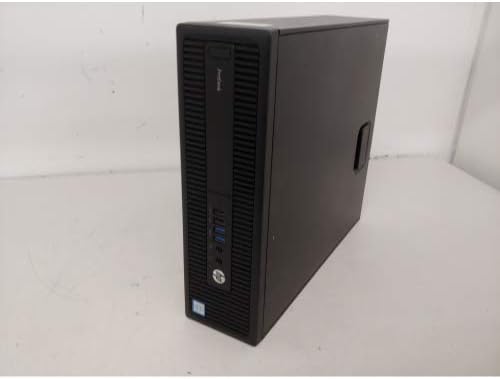
This isn't your typical sale you'd see flagged in here, but I just noticed there is one of those recycled office comps that always populates Amazon's bestseller lists that just popped up this month that is ~$125 better than one would normally expect for a comp with its specs. If anyone who pops into this thread was hoping to get into PC gaming on the cheap this is one way in:
($139) HP ProDesk 600 G1 (Refurbished, 90-Day Amazon Return Policy)
31AGLtPFFjL._AC_.jpg

  • i5-4570
  • 8GB (2x4GB) DDR3-1600 RAM [16GB max possible expansion, i.e. 2x8GB]
  • 500GB 5400 RPM HDD
  • DVD-RW
  • 240W PSU (Standard, 90% Platinum, 92% Titanium; no way to know which one you'll get)
  • Windows 10 Pro
  • Keyboard + Mouse
Here is the list of support documents:
HP ProDesk 600 G1 Small Form Factor PC: Support Manuals (most importantly the Service Guide)
HP ProDesk 600 G1 Small Form Factor PC: Document List

This would be the ideal GPU to pair. The service manual image for a PCIex16 replacement, and the list of compatible GPUs HP packaged with some units, shows there is sufficient space for the height & length:
($149) PNY VCG16504SFPPB-O GeForce GTX 1650 4GB XLR8 Gaming Overclocked Edition Graphics Card

All you need is a monitor, but most already have one they can use. Viable monitors in new condition begin as cheap as $80, and dedicated 144Hz gaming options begin around $159.

For $278 total you have a legit gaming PC.

In fact, even without the separate PNY video card, the Intel HD iGPU is compatible with NVIDIA's GeForce Now service, which is free in 1-hr chunks, so if you have a strong internet connection (ideally: <50 Mbps bandwidth with >40ms ping), and you simply build a library for free by grabbing games given away all the time, chiefly by Epic each week, you can start playing modern PC games including titles like Hitman 2 for $139.

Noob question- would a rx 5500 xt work with this?
 
Noob question- would a rx 5500 xt work with this?
No, don't do that, there isn't enough wattage in the PSU.

You'd want a prebuild that comes with a larger PSU. Some common PSU sizes that would probably suffice for a 5500 XT are 340W, 380W, 400W. However, you also might require special adapter cables because these prebuild PSUs often don't come with a particular cable connector required to power these more powerful GPUs (the RX 5500 XT requires an 8-pin PCIe connector). You need two 4-pin to 8-pin adapter cables to combine two cables, and even that requires further review because depending on how the PSU is constructed, you want to be careful that you aren't overloading a particular rail's power ceiling.

It's better to stick to the >75W TDP GPUs for this because they can draw power straight from the motherboard, and don't add much of a burden to the power demands on these typically anemic office build PSUs. The GTX 1650 is the best performing GPU in existence right now within this class.
 
No, don't do that, there isn't enough wattage in the PSU.

You'd want a prebuild that comes with a larger PSU. Some common PSU sizes that would probably suffice for a 5500 XT are 340W, 380W, 400W. However, you also might require special adapter cables because these prebuild PSUs often don't come with a particular cable connector required to power these more powerful GPUs (the RX 5500 XT requires an 8-pin PCIe connector). You need two 4-pin to 8-pin adapter cables to combine two cables, and even that requires further review because depending on how the PSU is constructed, you want to be careful that you aren't overloading a particular rail's power ceiling.

It's better to stick to the >75W TDP GPUs for this because they can draw power straight from the motherboard, and don't add much of a burden to the power demands on these typically anemic office build PSUs. The GTX 1650 is the best performing GPU in existence right now within this class.
240 isn’t enough for a 5500XT?

https://www.tomshardware.com/reviews/amd-radeon-rx-5500-xt-4gb/4
 
The PSU has enough juice but that card still needs a cable connection unlike the 1650.
No, the PSU only has sufficient wattage on paper. In reality, the power consumption of almost all CPUs and GPUs under the greatest stress testing loads exceeds their TDP significantly. Furthermore, while most office build PSUs are fortunately still built like tanks, with very high efficiency and build quality in order to endure the years, that isn't guaranteed, so once can never be certain what the peak sustained output wattage will be. This isn't usually an issue today. 7-8 years ago this was a much greater concern, with many cheaper PSUs crashing way below their quoted wattage at times. Another old caveat was a rail split. PSUs were often split into multiple rails. In this case you'd have 2x120W rails. Suddenly neither rail can handle the GPU. This was intended to prevent fire hazards because PSUs, especially those more cheaply made, were more likely to ignite with higher total amperages.

Even without these additional worries it's just not a good idea to put a 5500 XT in a 240W PSU build. The total system draw with that CPU alone will probably be around something like 120W-140W, off the top of my head, I'd have to reference old charts. If you plug the full build into one of the PSU calculators it ought to give you a more prudent figure as a baseline.
 
Back
Top