• We are currently experiencing technical difficulties. We sincerely apologize for the inconvenience.

Tech Gaming Hardware discussion (& Hardware Sales) thread

So a guy bought a $2k 4090 on day one from Newegg (direct, not a third party seller). He received a box with weights in it instead. When he contacted Newegg, they locked him out of his account. Steve from Gamer Nexus put them on blast and then not only did they fully refund the guy but they admitted fault.
In summation, fuck Newegg. Sad to see what they've become. You're basically shit on their shoes unless you have millions of followers on social media, then they roll out the red carpet.
 
So a guy bought a $2k 4090 on day one from Newegg (direct, not a third party seller). He received a box with weights in it instead. When he contacted Newegg, they locked him out of his account. Steve from Gamer Nexus put them on blast and then not only did they fully refund the guy but they admitted fault.
In summation, fuck Newegg. Sad to see what they've become. You're basically shit on their shoes unless you have millions of followers on social media, then they roll out the red carpet.
It is sad to see. They were a great company years ago. Today I would advise no one uses them. I feel like the shit they’ve been pulling should have criminal consequences
 
I don't understand why. The 13900K is just 5% stronger in gaming according to both Techspot (aka Hardware Unboxed) and Tom's Hardware's suites. It has 8 more total efficiency cores than the 13700K, and thus only 8 more total threads. Whether or not you choose to upgrade that in several years as a matter of strategy is irrelevant to the fact the 13900K isn't going to outlive the 13700K as a relevant gaming processor for an appreciable period of time. Their window as viable gaming processors, whether for Ultra/High settings, or to meet mandatory minimums, is going to be nearly identical.

I don't understand why you favor the inferior strategy for the long-term of going huge, then not updating for a decade. You can wait, but I doubt it behooves you much, because the focus for Intel & AMD going forward is on power efficiency. But since that's what you're doing, you might as well do it. Run that 3820 into the ground. Upgrade only once the game sputters, and won't start.

My current spec, now u see why I wanted an upgrade ;p

Also whats the difference between my RAM and DDR5 5-6k mhz? What exactly a difference will that add?

upload_2022-10-24_7-27-36.png
 
My current spec, now u see why I wanted an upgrade ;p

Also whats the difference between my RAM and DDR5 5-6k mhz? What exactly a difference will that add?

View attachment 949764

At this stage you can get something like:

13700K
DDR 5 RAM
GPU to be decided (await current gen release)

and you would be killing it for gaming. Save money on your CPU, put it on the GPU or on better RAM, and you'll be laughing all the way to the bank.

Your RAM is DDR3, so the difference between it and DDR5 (alongside the rest of the system changes) is going to be like night and day.
 
thoughts on this build? haven't had a dedicated desktop in years but my laptop is just not cutting it. My use is about 30-40% photo and video editing and the rest is just fucking around and gaming. My thoughts are this build would serve me for good photo/video stuff but also be pretty kickass at 1440 gaming. I think the obvious next upgrade would be on the GPU but i have zero plans for 4k gaming so not sure it's worth an extra $2k :eek: Anywhere i should spend more or spend less?
https://pcpartpicker.com/list/w6TbrD
 
thoughts on this build? haven't had a dedicated desktop in years but my laptop is just not cutting it. My use is about 30-40% photo and video editing and the rest is just fucking around and gaming. My thoughts are this build would serve me for good photo/video stuff but also be pretty kickass at 1440 gaming. I think the obvious next upgrade would be on the GPU but i have zero plans for 4k gaming so not sure it's worth an extra $2k :eek: Anywhere i should spend more or spend less?
https://pcpartpicker.com/list/w6TbrD
32gb of RAM is probably overkill for 1440.
The 970 Evo Plus is $40 less than the 980 Pro.
The 6750 XT is $100 less than the 3070 Ti and only about 5% slower at 1440 ultra.
 
32gb of RAM is probably overkill for 1440.
The 970 Evo Plus is $40 less than the 980 Pro.
The 6750 XT is $100 less than the 3070 Ti and only about 5% slower at 1440 ultra.
right, but im not just gaming. The ram is more for the photo/video stuff i do. and the few times i start playing a game not realizing i still have dozens of photos still open in capture one
 
Hard to find a PC with a DVD drive these days
Most office computers actually still come with one. For the custom build and DIY crowd it became unnecessary, especially once they started mass producing external usb powered dvd drives in 2018 and 2019
 
The connector on the 4090's a few have apparently been burning up at first I thought this was a joke but no apparently it's real or at least seems real. It using Intel's current sensor connector and is recommended that you upgrade your power supply to be equipped with that feature and follow proper handing of it.

NVIDIA-GeForce-RTX-4090-Graphics-Card-16-Pin-Connector-Burned-Melted-_1-555x740.webp


It was recently spotted that the NVIDIA 16-pin adapter cable for the GeForce RTX 4090 graphics cards is just too thick and not easy to manage in smaller PC cases as it hits the side panel really often. So users will have to bend the cable a lot to close the panel but once again, this bending is not recommended as it could heat up the cables and cause the adapter to burst up in flames.

These monster GPU require special handling to align the cable to avoid it overheating and burning up via the card heating up. This card maybe a bridge to far as far as the requirements but till more turn up with problems will see.


NVIDIA-GeForce-RTX-4090-Graphics-Card-16-Pin-Connector-Burned-Melted-_4.png


Last edited:
My current spec, now u see why I wanted an upgrade ;p

Also whats the difference between my RAM and DDR5 5-6k mhz? What exactly a difference will that add?

View attachment 949764
I recalled you said you had the i7-3820. The DDR5-6000MHz RAM is operating at 7.5x the frequency as your current RAM. Timings aren't as tight, but it's provides a huge boost to your game framerate and game loading (also overall system snappiness).

About CPU value: the CPU value charts (like Techspot does) are almost always misleading for most consumers because the reviewers evaluate the value of the CPU (in terms of frames per dollar) a la carte. The problem with this is that practically nobody buys a new CPU as an upgrade by itself. Almost without exception, one is also buying a new motherboard & new RAM; because the new CPU isn't compatible with the older MoBo/RAM, or simply to take advantage of the new CPU's capability to support faster RAM, and all of the motherboard's newer features. Often, one is buying a whole new system. What this means it the CPU value curve shifts upwards to favor the more expensive CPUs because suddenly the total dollars spent is much higher, and so the spectrum of frames per dollars changes. Techspot is aware of this, and that's why they've begun to do separate charts in their latest reviews. There is a CPU value chart, but then a CPU + RAM + Motherboard chart:
Cost vs. Performance
Even this isn't perfect because if one adheres rigidly to the concept, then tax affects the value consideration, too.

In your case, it sounds like you wish to build a whole new system. Good news is you have Windows 10 Pro, so you should be allowed to transfer your license for that to the new build. No OS cost for you. They still allow for free upgrades to Windows 11 from valid Windows 10 keys, too, if you desire.

For a build with 32GB DDR5 RAM targeting the highest performance before the value curve drops off, and costs become impractical, if you were in the USA, for all system parts, not counting the CPU or GPU, you'd be looking at ~$1050 USD (no tax). Then for the GPU (no tax):
  • $550 = RX 6800 XT
  • $700 = RX 6900 XT or RTX 3080 10GB
  • $800 = RX 6950 XT or RTX 3080 12GB
  • $900 = RTX 3080 Ti
  • $1000 = RTX 3090
  • $1500 = RTX 3090 Ti
  • $2200 = RTX 4090

That means you're looking at $1600-$3350 (no tax) before you even buy your CPU, and before tax. If we looked only at the CPU, today, the the 5600X would tops the chart for value. However, you'll find that with this total cost shift, the CPUs I mentioned to you earlier top the charts regardless of which GPU you pick. The 13600K/KF or 13700K/KF for Intel, and the 7600X or 7700X for AMD. However, notably, only the DDR5 pairings for these Intel CPUs are now along the top when considering total system cost.

You mentioned you found the thought of getting a lesser upgrade before upgrading again in several years depressing. Wrong way to look at it. Perhaps this is where your choice becomes more clear.

Historically, AMD has always supported sockets much longer than Intel. Additionally, Raptor Lake is on the back "Tock" half of Intel's "Tick-Tock" cycle. Don't expect the next gen of Intel CPUs to be compatible with the Z790 motherboards. Meanwhile, AMD just launched the AM5 socket. This is the ground level. This is their first brand new socket in 5 1/2 years (B350/X370 debuted in Feb-2017). Expect their next gen to be compatible with an X670 motherboard, and there is strong precedent to believe the next two gens after that will be compatible.

Don't waste money on the 7950X. Get the 7700X. Pocket the $300 difference. Put that towards your GPU, or save it, and in 2-4 years, put it towards the next Ryzen 7 offering (not Ryzen 9). That Ryzen 7 will shit on the 7950X (& 13900K). Furthermore, since you got in on the AM5 ground level, it's probable you could choose to be one of the only people in existence who upgrades your CPU, and nothing else. Even in the unlikely case you can't, and have to buy a new motherboard, you should be able to transplant the DDR5 RAM (also brand new). No reason to replace the whole system. Your case, PSU, drives, and CPU cooler will all still be viable.

After all, you don't even have to wait. With $300, you're 3/4th of the way there to a brand new Ryzen 7. Upgrade the CPU and nothing else immediately at the next gen. Guaranteed compatibility. Why not? You already practically paid for that CPU with the money you saved now. And just look at how the R7-7700X from this gen shits on the R9-5950X from last gen. In Techspots roundup, the 7700X averaged 240 fps to the 5950X's 181 fps. That's a whopping 32% jump in gaming.



Yea- I happen to have the original RTX 3080 (an EVGA card.. RIP :( ) and with the latest drivers that came out, it still holds up really really well. I don't own any games I can't play at 4K at under 80 FPS.

This is a case where a GPU's reach has exceeded gaming's grasp.

I'll just wait until the inevitable price drops and/or Ti editions come out.
 
The connector on the 4090's a few have apparently been burning up at first I thought this was a joke but no apparently it's real or at least seems real. It using Intel's current sensor connector and is recommended that you upgrade your power supply to be equipped with that feature and follow proper handing of it.

NVIDIA-GeForce-RTX-4090-Graphics-Card-16-Pin-Connector-Burned-Melted-_1-555x740.webp


It was recently spotted that the NVIDIA 16-pin adapter cable for the GeForce RTX 4090 graphics cards is just too thick and not easy to manage in smaller PC cases as it hits the side panel really often. So users will have to bend the cable a lot to close the panel but once again, this bending is not recommended as it could heat up the cables and cause the adapter to burst up in flames.

These monster GPU require special handling to align the cable to avoid it overheating and burning up via the card heating up. This card maybe a bridge to far as far as the requirements but till more turn up with problems will see.


NVIDIA-GeForce-RTX-4090-Graphics-Card-16-Pin-Connector-Burned-Melted-_4.png


My case is quite overkill in terms of size. Even my prior and current Nvidia card the power adapter for the GPU brushes up against the side panel. Quite shocking that Nvidia knew about this in their testing an didnt address it.
 
I recalled you said you had the i7-3820. The DDR5-6000MHz RAM is operating at 7.5x the frequency as your current RAM. Timings aren't as tight, but it's provides a huge boost to your game framerate and game loading (also overall system snappiness).

About CPU value: the CPU value charts (like Techspot does) are almost always misleading for most consumers because the reviewers evaluate the value of the CPU (in terms of frames per dollar) a la carte. The problem with this is that practically nobody buys a new CPU as an upgrade by itself. Almost without exception, one is also buying a new motherboard & new RAM; because the new CPU isn't compatible with the older MoBo/RAM, or simply to take advantage of the new CPU's capability to support faster RAM, and all of the motherboard's newer features. Often, one is buying a whole new system. What this means it the CPU value curve shifts upwards to favor the more expensive CPUs because suddenly the total dollars spent is much higher, and so the spectrum of frames per dollars changes. Techspot is aware of this, and that's why they've begun to do separate charts in their latest reviews. There is a CPU value chart, but then a CPU + RAM + Motherboard chart:
Cost vs. Performance
Even this isn't perfect because if one adheres rigidly to the concept, then tax affects the value consideration, too.

In your case, it sounds like you wish to build a whole new system. Good news is you have Windows 10 Pro, so you should be allowed to transfer your license for that to the new build. No OS cost for you. They still allow for free upgrades to Windows 11 from valid Windows 10 keys, too, if you desire.

For a build with 32GB DDR5 RAM targeting the highest performance before the value curve drops off, and costs become impractical, if you were in the USA, for all system parts, not counting the CPU or GPU, you'd be looking at ~$1050 USD (no tax). Then for the GPU (no tax):
  • $550 = RX 6800 XT
  • $700 = RX 6900 XT or RTX 3080 10GB
  • $800 = RX 6950 XT or RTX 3080 12GB
  • $900 = RTX 3080 Ti
  • $1000 = RTX 3090
  • $1500 = RTX 3090 Ti
  • $2200 = RTX 4090

That means you're looking at $1600-$3350 (no tax) before you even buy your CPU, and before tax. If we looked only at the CPU, today, the the 5600X would tops the chart for value. However, you'll find that with this total cost shift, the CPUs I mentioned to you earlier top the charts regardless of which GPU you pick. The 13600K/KF or 13700K/KF for Intel, and the 7600X or 7700X for AMD. However, notably, only the DDR5 pairings for these Intel CPUs are now along the top when considering total system cost.

You mentioned you found the thought of getting a lesser upgrade before upgrading again in several years depressing. Wrong way to look at it. Perhaps this is where your choice becomes more clear.

Historically, AMD has always supported sockets much longer than Intel. Additionally, Raptor Lake is on the back "Tock" half of Intel's "Tick-Tock" cycle. Don't expect the next gen of Intel CPUs to be compatible with the Z790 motherboards. Meanwhile, AMD just launched the AM5 socket. This is the ground level. This is their first brand new socket in 5 1/2 years (B350/X370 debuted in Feb-2017). Expect their next gen to be compatible with an X670 motherboard, and there is strong precedent to believe the next two gens after that will be compatible.

Don't waste money on the 7950X. Get the 7700X. Pocket the $300 difference. Put that towards your GPU, or save it, and in 2-4 years, put it towards the next Ryzen 7 offering (not Ryzen 9). That Ryzen 7 will shit on the 7950X (& 13900K). Furthermore, since you got in on the AM5 ground level, it's probable you could choose to be one of the only people in existence who upgrades your CPU, and nothing else. Even in the unlikely case you can't, and have to buy a new motherboard, you should be able to transplant the DDR5 RAM (also brand new). No reason to replace the whole system. Your case, PSU, drives, and CPU cooler will all still be viable.

After all, you don't even have to wait. With $300, you're 3/4th of the way there to a brand new Ryzen 7. Upgrade the CPU and nothing else immediately at the next gen. Guaranteed compatibility. Why not? You already practically paid for that CPU with the money you saved now. And just look at how the R7-7700X from this gen shits on the R9-5950X from last gen. In Techspots roundup, the 7700X averaged 240 fps to the 5950X's 181 fps. That's a whopping 32% jump in gaming.

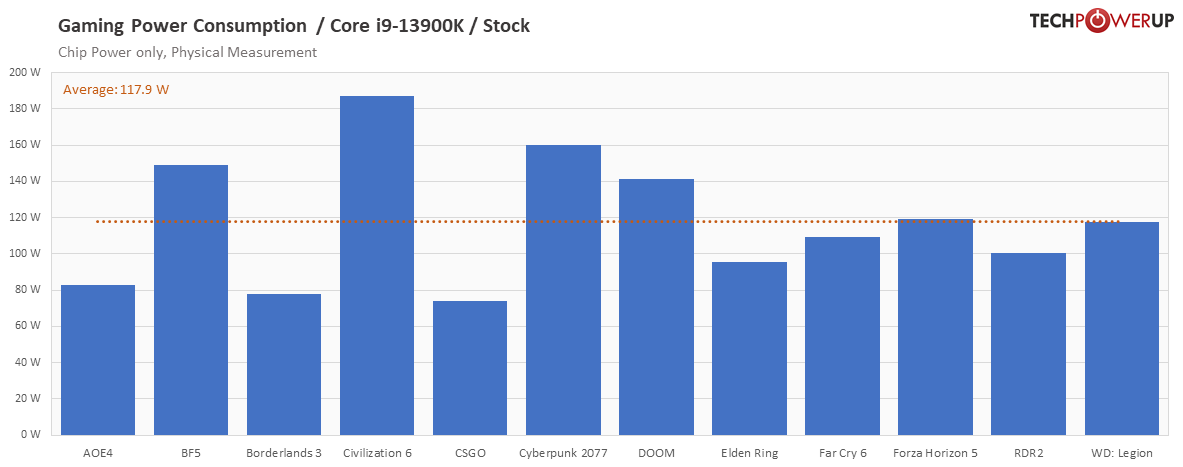
In regard to 13900k I found the power consumption chart. It appears that power consumption for my general day to day needs are pretty much the same in line with my i3820;

You can see all charts here: https://www.techpowerup.com/review/intel-core-i9-13900k/22.html

power-per-game.png


And here are i3820

https://www.guru3d.com/articles-pages/core-i7-3820-processor-review,7.html


Based on that if I decide in the end to get 13900k do you think it will reflect hugely on my electric bill?
 
In regard to 13900k I found the power consumption chart. It appears that power consumption for my general day to day needs are pretty much the same in line with my i3820;

You can see all charts here: https://www.techpowerup.com/review/intel-core-i9-13900k/22.html

power-per-game.png


And here are i3820

https://www.guru3d.com/articles-pages/core-i7-3820-processor-review,7.html


Based on that if I decide in the end to get 13900k do you think it will reflect hugely on my electric bill?
You don't understand what you're looking at. The power consumption chart from Techpowerup is for the CPU only. Nothing else. Not the case for the Guru3D chart you linked. It's also only the average across 12 games. It's stretching up to 185W in the sole TBS game, Civlization VI.

I don't know how many times I have to repeat this. The 13900K is a stupid purchase for someone who only wants to use it for gaming.
 
@Nameless King How long have you been into PC gaming? The i9 has always been a clown purchase if you're mainly gaming.
 
I put together two options for myself, an AMD and an Intel build. I'm leaning towards the AMD build because of the lower estimated power consumption. Is it safe to assume that less power = less heat dissipation? i've always hated how a powerful PC can turn my office into a sauna. The price points on these builds are basically equal but there are some pros and cons to each. IMO AMD pros are: lower power, less heat, possible to do a CPU upgrade without a MB + ram upgrade in 3ish years. Intel pros: more premium MB (no plans to OC so maybe i can reduce cost here), maybe some better performance in certain programs/circumstances but for gaming i think they are about neck and neck. Am i missing anything here?
AMD build
upload_2022-10-25_9-46-59.png upload_2022-10-25_9-47-28.png
 
Last edited:
The connector on the 4090's a few have apparently been burning up at first I thought this was a joke but no apparently it's real or at least seems real. It using Intel's current sensor connector and is recommended that you upgrade your power supply to be equipped with that feature and follow proper handing of it.

NVIDIA-GeForce-RTX-4090-Graphics-Card-16-Pin-Connector-Burned-Melted-_1-555x740.webp


It was recently spotted that the NVIDIA 16-pin adapter cable for the GeForce RTX 4090 graphics cards is just too thick and not easy to manage in smaller PC cases as it hits the side panel really often. So users will have to bend the cable a lot to close the panel but once again, this bending is not recommended as it could heat up the cables and cause the adapter to burst up in flames.

These monster GPU require special handling to align the cable to avoid it overheating and burning up via the card heating up. This card maybe a bridge to far as far as the requirements but till more turn up with problems will see.


NVIDIA-GeForce-RTX-4090-Graphics-Card-16-Pin-Connector-Burned-Melted-_4.png


Jay warned about this in his 4090 review
 
Back
Top