Tech Gaming Hardware discussion (& Hardware Sales) thread

Just bought a 4070, came with Diablo 4 for free, for my new build. Any suggestions on what Intel CPU to pair it with? I mostly just game and some streaming. I play at 2k and don't really see me going to 4k anytime soon. I have an I5 2500 right now that has served me well and still going strong. I9's seem like overkill.
The i5 13400 runs cool but not as powerfull as the i5 13600k. Or should i go for an i7? I don't have a problem spending more and on a air/liquid cooler either.
Any suggestions? Motherboard suggestions are welcome too.
If you're located in the USA, the bang-for-your-buck of the i5-13500 smokes the i5-13400. Not only does the former enjoy +200MHz on the boost clock, it isn't a cut-down version of the 13600K with just 10 cores (6p+4e). It has the full 14 cores (6p+8e), and if you're leveraging the CPU for streaming, not the NVIDIA GPU with NVENC, those efficiency cores will matter. Either way, for just $20 more, it's easily worth the extra cash.

Maybe someone else can weigh in. Frankly, I've never spent much time looking at streaming benchmarks, so I'm not sure how much there is to gain by spending $150+ more for the i7's. But I thought I could contribute at least the above.
 
Desktop GPU Sales Lowest in Decades: Report
ChiefAmbitiousGalapagoshawk-max-1mb.gif
Good. NVidia and scalpers need to learn a lesson
 
Just bought a 4070, came with Diablo 4 for free, for my new build. Any suggestions on what Intel CPU to pair it with? I mostly just game and some streaming. I play at 2k and don't really see me going to 4k anytime soon. I have an I5 2500 right now that has served me well and still going strong. I9's seem like overkill.
The i5 13400 runs cool but not as powerfull as the i5 13600k. Or should i go for an i7? I don't have a problem spending more and on a air/liquid cooler either.
Any suggestions? Motherboard suggestions are welcome too.

I think that liquid cooling only makes sense if you are try to alleviate your CPU as the bottleneck. I have a I7-9700k that I overclock to 5.1 ghz with liquid cooling. The only thing that I think that really bought me is pushing out the desire to upgrade my CPU by a few years. I am losing frames with a 7900 xtx but it isn't a lot usually since most games are not CPU heavy and I don't play at 1080p. I think I spent like $140 on my cosair liquid cooler so maybe it cost me maybe $40 for each year I put off getting a better CPU. Upgrading is only about changing your choke point.
 
Last edited:
If you're located in the USA, the bang-for-your-buck of the i5-13500 smokes the i5-13400. Not only does the former enjoy +200MHz on the boost clock, it isn't a cut-down version of the 13600K with just 10 cores (6p+4e). It has the full 14 cores (6p+8e), and if you're leveraging the CPU for streaming, not the NVIDIA GPU with NVENC, those efficiency cores will matter. Either way, for just $20 more, it's easily worth the extra cash.

Maybe someone else can weigh in. Frankly, I've never spent much time looking at streaming benchmarks, so I'm not sure how much there is to gain by spending $150+ more for the i7's. But I thought I could contribute at least the above.

How about the i5 13600k? It's only $60 more. I have no problem dropping $300-400 on a cpu. My budget range is roughly $2500-3000 overall.
 
How about the i5 13600k? It's only $60 more. I have no problem dropping $300-400 on a cpu. My budget range is roughly $2500-3000 overall.
You'll also need a cooler for the 13600k (and you'll probably want a better cooler for the 13500 than the stock one).
 
How about the i5 13600k? It's only $60 more. I have no problem dropping $300-400 on a cpu. My budget range is roughly $2500-3000 overall.
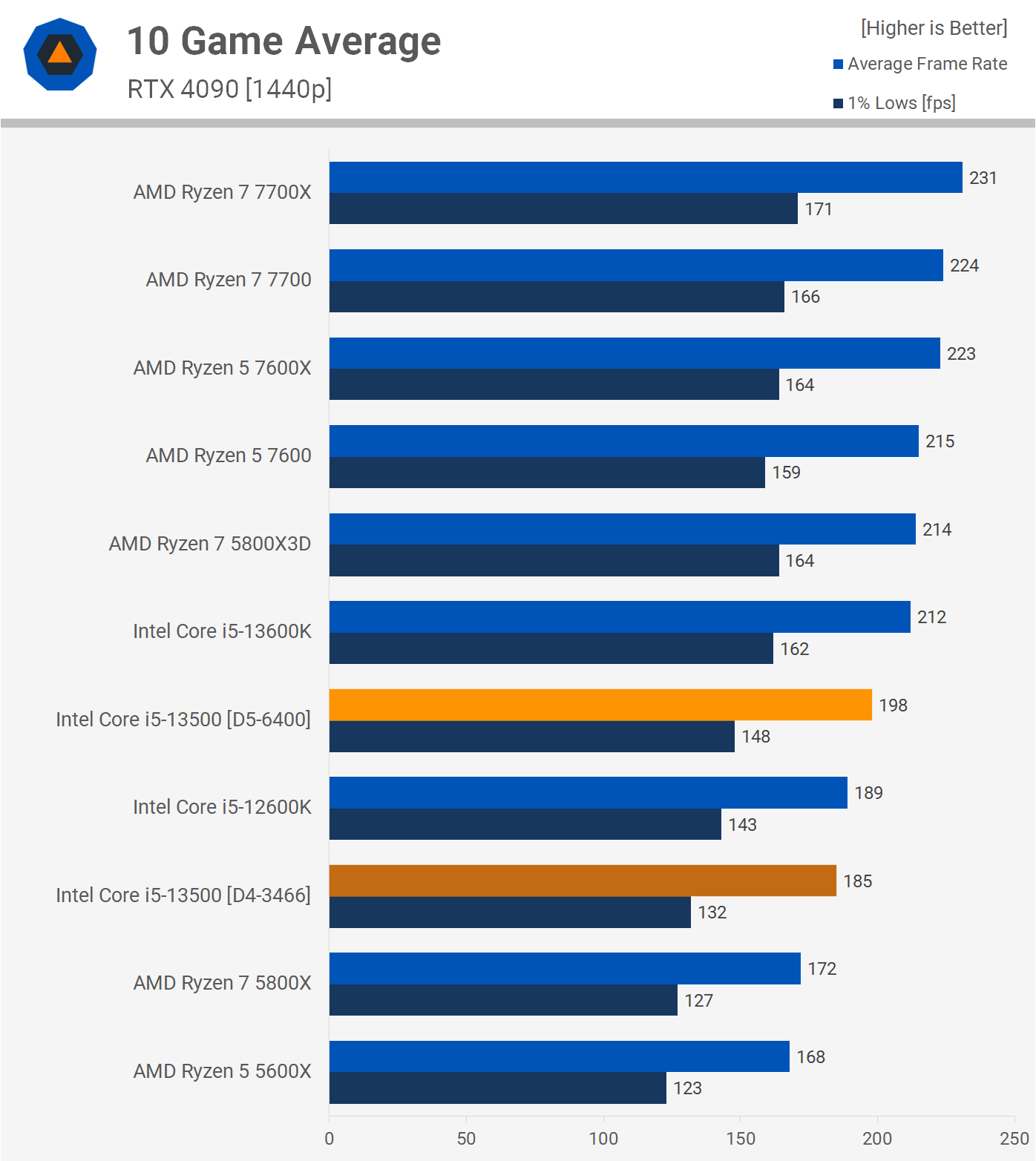
The difference between the 13500 and 13600K probably won't matter a great deal for streaming. The 13600K's boost frequency is listed as +300MHz higher on paper although you'll need a powerful cooler to ensure that's practically realized. The higher frequencies on the top cores will matter more to gaming.
1440p.png


If you're located in the USA, the bang-for-your-buck of the i5-13500 smokes the i5-13400. Not only does the former enjoy +200MHz on the boost clock, it isn't a cut-down version of the 13600K with just 10 cores (6p+4e). It has the full 14 cores (6p+8e), and if you're leveraging the CPU for streaming, not the NVIDIA GPU with NVENC, those efficiency cores will matter. Either way, for just $20 more, it's easily worth the extra cash.

Maybe someone else can weigh in. Frankly, I've never spent much time looking at streaming benchmarks, so I'm not sure how much there is to gain by spending $150+ more for the i7's. But I thought I could contribute at least the above.

The 13500 is on sale for $210 on Amazon. Ships and sold by Amazon.
 
I bought the recently released LG 45 inch 240hz curved display. I figured I would share my experience with the 240hz OLED panel. Very good gaming monitor like unreal but I would not recommend it for general purposes work like spreadsheets an word documents. The screen resolution an text displayed is weaker elements of the panel. It's price to are big factors.

If a big panel your looking for I would look at 27 inch OLED especially based on price. If your budget handle it an are a big gamer it's hard to beat. But 1600 bucks is a hard ask for purely a gaming monitor. With limited work such as watching youtube or web browsing.

You can buy 49 inch curved monitors with OLED for less money but don't have the same workable area. If this monitor was brighter an 5k for 1400 it would be a huge win.

Anyway this is my experience though I am keeping the monitor. It's really good for what I am doing.
 
I bought the recently released LG 45 inch 240hz curved display. I figured I would share my experience with the 240hz OLED panel. Very good gaming monitor like unreal but I would not recommend it for general purposes work like spreadsheets an word documents. The screen resolution an text displayed is weaker elements of the panel. It's price to are big factors.

If a big panel your looking for I would look at 27 inch OLED especially based on price. If your budget handle it an are a big gamer it's hard to beat. But 1600 bucks is a hard ask for purely a gaming monitor. With limited work such as watching youtube or web browsing.

You can buy 49 inch curved monitors with OLED for less money but don't have the same workable area. If this monitor was brighter an 5k for 1400 it would be a huge win.

Anyway this is my experience though I am keeping the monitor. It's really good for what I am doing.
Don't some OLEDs use a different sub-pixel layout that's not currently supported by ClearType? Pretty sure I remember this can cause them to have weird results when displaying text, like colored fringing around letters.
 
Don't some OLEDs use a different sub-pixel layout that's not currently supported by ClearType? Pretty sure I remember this can cause them to have weird results when displaying text, like colored fringing around letters.
It's possible I did not know about this information need to look into it. It does have fantastic reviews on Best Buy website. Its resolution is 4k an I just thought that an not being brighter was the reason for it.
 
I'm surprised no one has mentioned the Ryzen 5 5600x3d leaks.
One last AM4 budget option would be great.
 
If the increase over the 5600X non 3D is the same as the 5800X3D was over the non 3D 5800X it would be roughly in line with an overclocked 7600X.
 
I got an i5 12400 + MSI "Mortar Max" B660 bundle at Microcenter for $300 and the mobo actually has a feature that lets you overclock locked intel CPUs.

82107413.jpg
 
@Madmick Does any site do GPU benchmarks with medium/high/ultra settings at each resolution? I'm looking for one (preferably Nvidia since I emulate) that's good for 1440p high (monitor) and 4k medium settings (TV). I'm guessing something like a 4070.
 
@Madmick Does any site do GPU benchmarks with medium/high/ultra settings at each resolution? I'm looking for one (preferably Nvidia since I emulate) that's good for 1440p high (monitor) and 4k medium settings (TV). I'm guessing something like a 4070.
Off the top of my head nobody really does that. Most of the major reviewers limit different settings comparisons to with ray-tracing on and with it off, but always for High or Ultra settings at various resolutions. Sometimes DSO will do that, but the focus is always on a specific game, and how well it is optimized for PC.

I've noticed the YouTubers tend to do different graphic settings the most. You can peel through them. But the annoying part is that most videos focus on a single game. Examples:


Back
Top