Windows 11 thread (Windows 10 support to end in 2025): Update is now live and free

PEB

Astronomer: the largest solar flare heading toward
Platinum Member
Joined
Jan 20, 2004
Messages
34,795
Reaction score
27,837
Cloud powered really Microsoft and an Apple Mac 2010 interface seriously Microsoft. It's just a way to ram Microsoft cloud on everyone. I don't know why Microsoft is not listening to consumers building easy of use and problem free running seems simple enough. Saving layouts we do that now for the most part more Microsoft seeking to get information about your use. I hear to that they took stuff away to make it smaller more mobile friendly and run faster on tablets. I like to game on higher end PC's not on laptops. They need to show more gaming stuff.


*Mod Edit*
Click the below link to jump directly to a post I made with a guide for upgrading:
https://forums.sherdog.com/posts/166274878/
 
Last edited by a moderator:
This looks completely pointless I don't want this shit. I don't want anything on cloud and I don't want center icons on my taskbar. None of these things are even really improvements.


Not sure what Linus is talking about on Windows 11 but something about 3rd party custom computer an settings? This would suck if you had BIOS issues too on older? Motherboards?
 
Only thing i dislike is that the taskbar is locked to the bottom and must always show. Ive been using taskbar on the top with autohide for 15+ years : (
 
  • Like
Reactions: PEB
Fuck 'em, I hope it fails and they are forced to stick with 10 like they said they would.
 
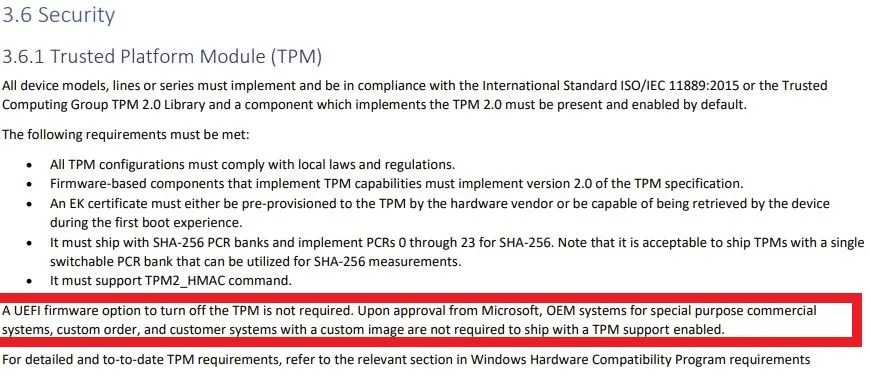
The only issue I see so far is the TPM 2.0 requirement. Even Ryzen 1rst gen isn't supported, that's only 4 years old. I run a Sandy Bridge i3 HTPC/pi-hole setup that definitely doesn't have the header for TPM 2.0, and I'm not upgrading that PC just for Windows 11.

WINDOWS 11 SUPPORT FOR INTEL
  • Intel 8th Gen (Coffee Lake)
  • Intel 9th Gen (Coffee Lake Refresh)
  • Intel 10th Gen (Comet Lake)
  • Intel 10th Gen (Ice Lake)
  • Intel 11th Gen (Rocket Lake)
  • Intel 11th Gen (Tiger Lake)
  • Intel Xeon Skylake-SP
  • Intel Xeon Cascade Lake-SP
  • Intel Xeon Cooper Lake-SP
  • Intel Xeon Ice Lake-SP
WINDOWS 11 SUPPORT FOR AMD
  • AMD Ryzen 2000
  • AMD Ryzen 3000
  • AMD Ryzen 4000
  • AMD Ryzen 5000
  • AMD Ryzen Threadripper 2000
  • AMD Ryzen Threadripper 3000
  • AMD Ryzen Threadripper Pro 3000
  • AMD EPYC 2nd Gen
  • AMD EPYC 3rd Gen
 
The only issue I see so far is the TPM 2.0 requirement. Even Ryzen 1rst gen isn't supported, that's only 4 years old. I run a Sandy Bridge i3 HTPC/pi-hole setup that definitely doesn't have the header for TPM 2.0, and I'm not upgrading that PC just for Windows 11.

WINDOWS 11 SUPPORT FOR INTEL
  • Intel 8th Gen (Coffee Lake)
  • Intel 9th Gen (Coffee Lake Refresh)
  • Intel 10th Gen (Comet Lake)
  • Intel 10th Gen (Ice Lake)
  • Intel 11th Gen (Rocket Lake)
  • Intel 11th Gen (Tiger Lake)
  • Intel Xeon Skylake-SP
  • Intel Xeon Cascade Lake-SP
  • Intel Xeon Cooper Lake-SP
  • Intel Xeon Ice Lake-SP
WINDOWS 11 SUPPORT FOR AMD
  • AMD Ryzen 2000
  • AMD Ryzen 3000
  • AMD Ryzen 4000
  • AMD Ryzen 5000
  • AMD Ryzen Threadripper 2000
  • AMD Ryzen Threadripper 3000
  • AMD Ryzen Threadripper Pro 3000
  • AMD EPYC 2nd Gen
  • AMD EPYC 3rd Gen
It sounds like a lot of people will hold on to their Windows 10 for some time to come. I am running 7th Gen Intel for now.
 
It sounds like a lot of people will hold on to their Windows 10 for some time to come. I am running 7th Gen Intel for now.

7th gen should have a TPM header on the motherboard. But of course they're being scalped.
 
  • Like
Reactions: PEB
Windows being able to support android apps via Amazon store app is pretty huge. Means we should be able to sideload Android apps onto the system to bypass even the Amazon app store in order to get Google play apps on Windows 11 devices. Good news for my Surface Pro 7. Should be able to have the ultimate Windows device and the ultimate Android device in one package without Android launchers.

Pretty happy it's a free upgrade too. Looking forward to MS finally breaking their "every other OS sucks" cycle they have been on for decades.
 
Windows being able to support android apps via Amazon store app is pretty huge. Means we should be able to sideload Android apps onto the system to bypass even the Amazon app store in order to get Google play apps on Windows 11 devices. Good news for my Surface Pro 7. Should be able to have the ultimate Windows device and the ultimate Android device in one package without Android launchers.

Pretty happy it's a free upgrade too. Looking forward to MS finally breaking their "every other OS sucks" cycle they have been on for decades.
That's actually pretty cool. Not sure how many android apps are worthwhile for a computer but I like having that as an option.

As long as the general interface isn't fucked with too much and I can customize it to roughly function as I am used to then I'm fine.

taskbarleft_1.jpg


I mean, as long as Shell makes a W11 version of their custom start menu then this really doesn't look much different from what I have already with W10
 
Windows being able to support android apps via Amazon store app is pretty huge. Means we should be able to sideload Android apps onto the system to bypass even the Amazon app store in order to get Google play apps on Windows 11 devices. Good news for my Surface Pro 7. Should be able to have the ultimate Windows device and the ultimate Android device in one package without Android launchers.

Pretty happy it's a free upgrade too. Looking forward to MS finally breaking their "every other OS sucks" cycle they have been on for decades.

What android apps do you want on your desktop?
 
What android apps do you want on your desktop?

I like to jailbreak and root devices. You can do alot of stuff through rooted Android apps that will let you bypass a ton of paywalls and mod apps to get functionality they otherwise wouldn't have.

Not condoning any of this, but NFL Gamepass and the old UFC app on rooted devices would get me every NFL game for free in HD and castable to my theater and same with the UFC app. This just gives us many many more possibilities without having to worry about things like loading into Phoenix app on a Windows device and hoping everything works fine.
 
Whatever else its faults are surely to be the highlighted in red are metal as fuck:
https://www.cnet.com/tech/computing...features-device-compatibility-price-and-more/

7 New Standout Features in Windows 11
  1. A new, more Mac-like interface. Windows 11 features a clean design with rounded corners, pastel shades and a centered Start menu and Taskbar.
  2. Integrated Android apps. Android apps will be coming to Windows 11 and installable from within the new Microsoft Store via the Amazon Appstore. (There were a couple of ways to access Android apps on Windows 10, including if you had a Samsung Galaxy phone, but this will make it native.)
  3. Widgets. While they've been around for a while (remember desktop gadgets on Windows Vista?), including in a recent Windows 10 update, you can now access widgets directly from the Taskbar and personalize them to see whatever you'd like.
  4. Microsoft Teams integration. Teams is getting a face-lift and will be integrated directly into the Windows 11 Taskbar, making it easier to access (and a bit more like Apple's FaceTime). You'll be able to access Teams from Windows, Mac, Android or iOS.
  5. Xbox tech for better gaming. Windows 11 will get certain features found in Xbox consoles, like Auto HDR and DirectStorage, to improve gaming on your Windows PC.
  6. Better virtual desktop support. Windows 11 will let you set up virtual desktops in a way that's more similar to MacOS, toggling between multiple desktops for personal, work, school or gaming use.
  7. Easier transition from monitor to laptop, and better multitasking. The new OS includes features called Snap Groups and Snap Layouts -- collections of the apps you're using at once that sit in the Taskbar, and can come up or be minimized at the same time for easier task switching. They also let you plug and unplug from a monitor more easily without losing where your open windows are located.
 
Back
Top