Under review Security error occurred. Please press back, refresh the page, and try again.

My work around for this issue is going to a subforum you rarely or never post in and attempt to login from there. This happens to me sporadically as well, but either goes away after the noted work around, or I'll clear the cache/history and that may be fixing too.
I was skeptical of that working to be honest but it does.

I clicked on Mayberry for instance and same pop up, I click on pro wrestling section and it allows me to log in.
Thank you.
 
I was skeptical of that working to be honest but it does.

I clicked on Mayberry for instance and same pop up, I click on pro wrestling section and it allows me to log in.
Thank you.
No worries. I went to the places i never post and for some reason would have no issue. Gotta be related to the cache/cookies.
 
My work around for this issue is going to a subforum you rarely or never post in and attempt to login from there. This happens to me sporadically as well, but either goes away after the noted work around, or I'll clear the cache/history and that may be fixing too.
this worked for me, havent been able to get on with my work mac for a while............ no matter how much data I would clear, it wouldnt work until login on from this very thread....... weird how that works, but it did the trick!
 
It just happened again (post update).
 
My work around for this issue is going to a subforum you rarely or never post in and attempt to login from there. This happens to me sporadically as well, but either goes away after the noted work around, or I'll clear the cache/history and that may be fixing too.
Just came here for this problem. Never post here so I tried logging in and low and behold it worked. Thanks!
 
I have been having difficulty for months with logging in. I keep getting the oops try again message. Or else I’m brought to a screen where it states there is two step authentication but there is no where to enter the code. I just downloaded the app and after trying for an hour eventually got in. I have emailed support multiple times and got no response. What is going on? I’ve also tried on multiple phones Mac and laptop.
 
I have been having difficulty for months with logging in. I keep getting the oops try again message. Or else I’m brought to a screen where it states there is two step authentication but there is no where to enter the code. I just downloaded the app and after trying for an hour eventually got in. I have emailed support multiple times and got no response. What is going on? I’ve also tried on multiple phones Mac and laptop.
Password / Security - Turn off 2FA
 
Where do I get the option to turn it off? I’ve finally managed to get on but only in the app. I can use the site on my laptop or desktop?
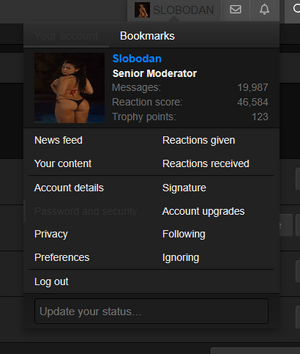
Click on your profile name on the top right and you will see the option for password and security:

1757424818844.png

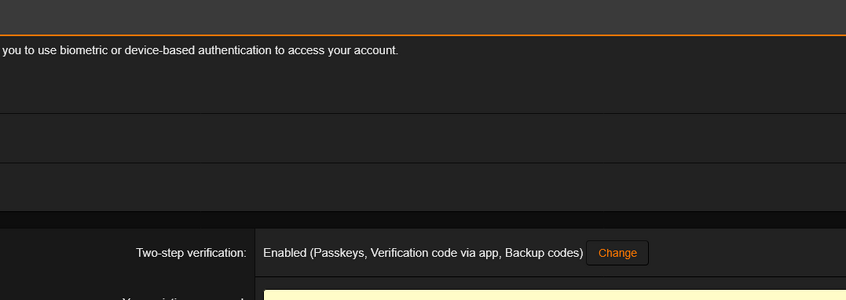
Once there you will see the option to change two-step verification:

1757424856134.png

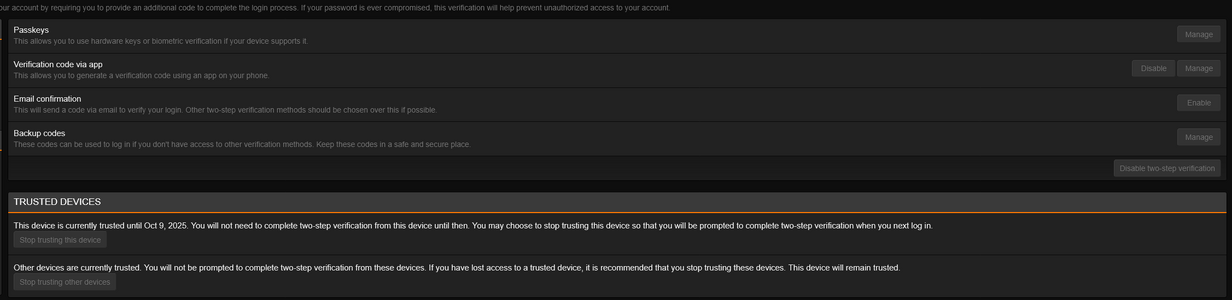
Press "change" and it will ask for your password to confirm. Then you will get to this page and will have the option to disable two-step verification:

1757424905453.png
 
  • Angry
Reactions: lsa
It’s back to just giving me the oops something has gone wrong message when I try to log in.
 
It’s back to just giving me the oops something has gone wrong message when I try to log in.
We're still working on this! Tricky one that only affects some. Sorry for the disruption to your board experience.
 
Back
Top