
- Joined
- Jul 4, 2009
- Messages
- 70,300
- Reaction score
- 43,359
I never claimed otherwise.



Sad but true. The base model rtx 4060 was on a 107 series die which is literally a xx50 tier chip by classification (transistor and die count where both on par with the last gen ipads). PCB and memory bus where xx50 tier as well. It's why it couldn't even match a previous gen 3060 Ti. Pretty embarrassing if you think about, like you said they don't even compete anymore on the low-end.At the high end, Nvidia smacks AMD around.
But once you get down to the 4060 price range, AMD starts to become a better option. Nvidia just doesn't compete on the low end anymore.


 wccftech.com

I'd bet almost anything they get refunded. This happened like 20 years ago when people were selling cardboard boxes with an X written on them and sold them as "X Box."Nvidia RTX 5090 eBay Price Soars to $9,000 as Users Revolt With Framed Photo Listings to Trick Bots and Scalpers
Nvidia RTX 5090 eBay Price Soars to $9,000 as Users Revolt With Framed Photo Listings to Trick Bots and Scalpers - IGN
Nvidia RTX 5090s are selling for as much as $9,000 on eBay as disgruntled customers revolt with fake listings designed to trick bots and scalpers.www.ign.com
damn, so thats why i was seeing people listing pictures of 5090's for 5090 prices. they are scamming the bots and scalpers!
this one sold for $2500 USD
i wonder if the buyers will be able to get a refund? i mean they're clearly getting scammed, but they didn't take the time to read the description and were using automated software to try to buy up an item before the next person can get it, so it's kinda on them a little too.
would suck to be the regular gamer just hoping to luck out and find one for $2500 USD only to end up getting duped by these. but my heart bleeds purple piss for the scalpers and botters.


This video shows why NVIDIA is so cocky with pricing aimed at gamers, and doesn't feel the need to be remotely competitive on rasterization-per-dollar, anymore. Skip to 4:13 starting with the difference in the Hogwarts dinner hall in last year's Hogwarts: Legacy to see how plain and gaping the advantage of DLSS 4's new Transformer-based upscaling is over all other competing technologies in terms of image quality. It's superior even to native 4K, drastically. FSR and XeSS lack detail and clarity, especially with lighting and reflections. Furthermore, they are unstable, shimmering, noisy messes in motion, and you can see that throughout the video (ex. the panning shot in the Hogwarts courtyard; the ceiling fan in Alan Wake). Quite plainly, everything else looks like crap compared to it. You don't have to squint.
But as GN covered in their recent video, this doesn't really make the new RTX 50 series cards terribly appealing over, for example, RTX 40 series cards that will remain on the market, presumably with a much stronger rasterization-per-dollar, because older NVIDIA cards are also getting the Transformer upgrade. The exclusivity of MFG (multi-frame generation) doesn't make RTX 50 appealing because, first, it isn't one of these software technologies within the DLSS suite that seems to make a huge difference in terms of image quality to the eye versus traditional FG (as for image smoothness); second, even for what benefit you do see, the only people who would seem to truly benefit are gamers on 240+ Hz monitors, and that is still a fringe minority of PC gamers. Because it's glorified interpolation. Remember the "soap opera" effect on TVs in the last decade? So it's funny watching Steve try not to crack up laughing when he talks about trying to objectively compare the merits of "fake frames".
TLDR: NVIDIA are dicks, but their arrogance isn't like Intel's arrogance as AMD cultivated Zen. Because NVIDIA isn't complacent. They aren't resting on their laurels. They continue to innovate, engineer, and distance themselves from their rivals.

This is of course anecdotal but I have had my OLED monitor for a year now with no burn in. It was a major fear of mine but no, no sign of burn-in. I run the pixel refresh cycle (every 4 hours), sometimes I wait 5 hours if I'm in the middle of playing a game or doing something. It lasts 4 minutes so I used it as a break.Would appreciate your thoughts. Since I've been searching lots for a gaming 4K OLED I'm getting a lot of notifications. One was saying OLEDs have maintenance and burn in issues. This seems to me to be 99% bullshit. I understand it's possible to theoretically get burn in, but have never ever heard anyone in practice actually have a monitor ruined by it. I just don't see it as a realistic reason to not go OLED. Thoughts?

This is of course anecdotal but I have had my OLED monitor for a year now with no burn in. It was a major fear of mine but no, no sign of burn-in. I run the pixel refresh cycle (every 4 hours), sometimes I wait 5 hours if I'm in the middle of playing a game or doing something. It lasts 4 minutes so I used it as a break.
If you leave one static image on there for a week straight, I could see it but otherwise, I think we're at the point where OLED has matured enough to mitigate a lot of burn in.
My one prompts me to do it every 4 hours, if I leave it and the monitor goes to standby, it will run the cycle automatically after about 5-10 minutes.Do OLED monitors not have automatic ones once you've turned them to stand by / off like OLED TV's do?
My one prompts me to do it every 4 hours, if I leave it and the monitor goes to standby, it will run the cycle automatically after about 5-10 minutes.
Don't you set your .monitor to turn off automatically if not in use for X amount of .minutes? Isn't that the easiest and moat sure fire way to ensure no issues? Sorry for typos I am drinkingMy one prompts me to do it every 4 hours, if I leave it and the monitor goes to standby, it will run the cycle automatically after about 5-10 minutes.
Yeah mine will turn off after 2 minutesDon't you set your .monitor to turn off automatically if not in use for X amount of .minutes? Isn't that the easiest and moat sure fire way to ensure no issues? Sorry for typos I am drinking
So basically to summarise from my posts aboveDon't you set your .monitor to turn off automatically if not in use for X amount of .minutes? Isn't that the easiest and moat sure fire way to ensure no issues? Sorry for typos I am drinking

Would appreciate your thoughts. Since I've been searching lots for a gaming 4K OLED I'm getting a lot of notifications. One was saying OLEDs have maintenance and burn in issues. This seems to me to be 99% bullshit. I understand it's possible to theoretically get burn in, but have never ever heard anyone in practice actually have a monitor ruined by it. I just don't see it as a realistic reason to not go OLED. Thoughts?

 www.dsogaming.com
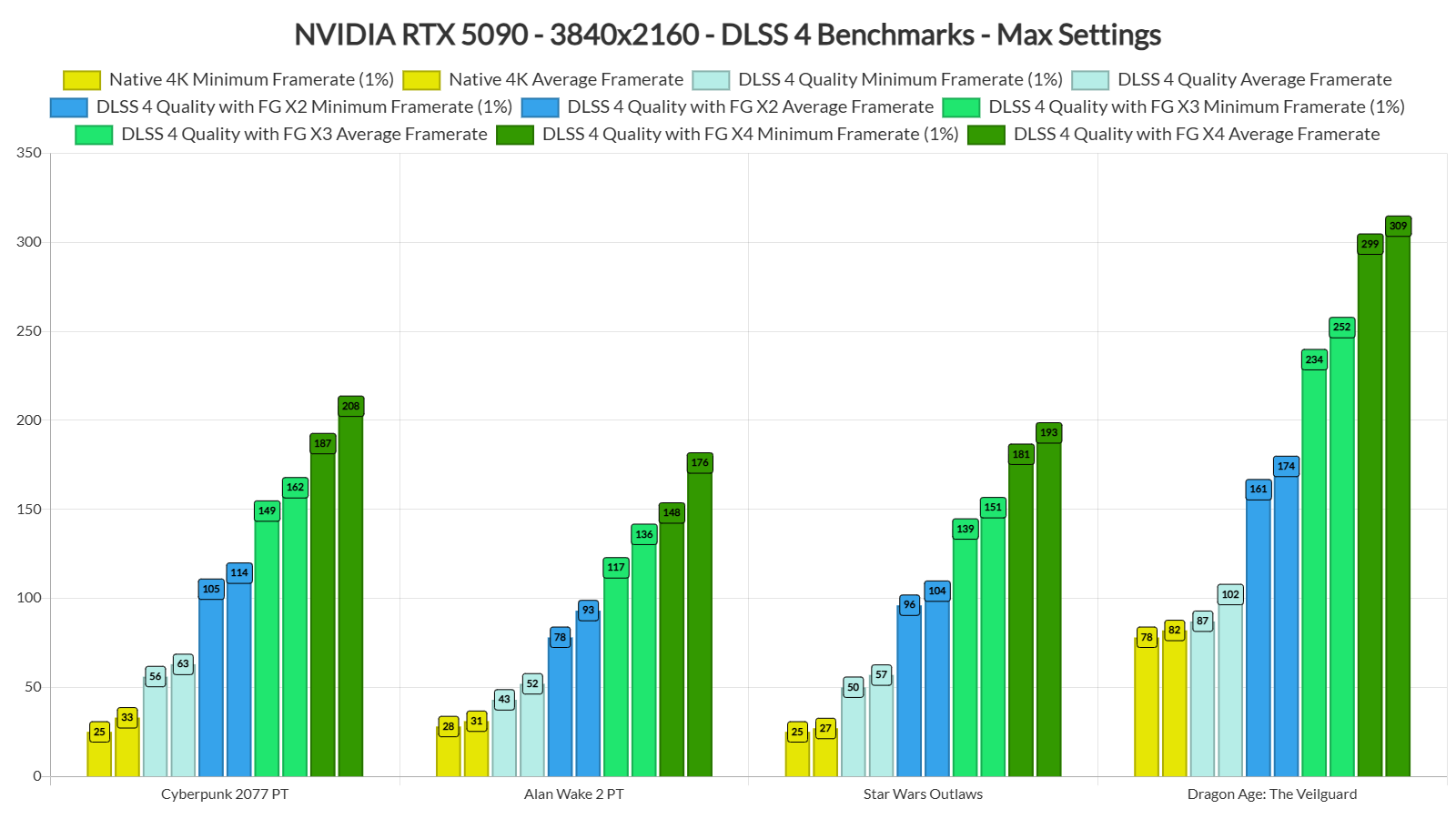
Let’s start with Cyberpunk 2077. With DLSS 4 Quality Mode, we were able to get a minimum of 56FPS and an average of 63FPS at 4K with Path Tracing. Then, by enabling DLSS 4 Multi-Frame Gen X3 and X4, we were able to get as high as 200FPS. Now what’s cool here is that I did not experience any latency issues. The game felt responsive and it looked reaaaaaaaaaaaaaally smooth.
And that’s pretty much my experience with all the other titles. Since the base framerate (before enabling Frame Generation) was between 40-60FPS, all of the games felt responsive. And that’s without NVIDIA Reflex 2 (which will most likely reduce latency even more).
I cannot stress enough how smooth these games looked on my 4K/240Hz PC monitor. And yes, that’s the way I’ll be playing them. DLSS 4 MFG is really amazing, and I can’t wait to try it with Black Myth: Wukong and Indiana Jones and the Great Circle. With DLSS 4 X4, these games will feel smooth as butter.
And I know what some of you might say. “Meh, I don’t care, I have Lossless Scaling which can do the same thing“. Well, you know what? I’ve tried Lossless Scaling and it’s NOWHERE CLOSE to the visual stability, performance, control responsiveness, and frame delivery of DLSS 4. If you’ve been impressed by Lossless Scaling, you’ll be blown away by DLSS 4. Plain and simple.


Because they were even able run games like Alan Wake 2 and Cyberpunk 2077 on Ultra settings with path-tracing in 8K at 80+ & 90+ FPS rates thanks to the "fake frames".
Also, as was just brought up, recently, the 4060 Ti has gotten beaten up by the 7700 XT since it released, but in Spider-Man 2, with the latest DLSS, even without MFG enabled, the 4060 shoots past it, and remember, the true superiority of DLSS isn't about framerates, usually, but image quality. Perhaps the even more important takeaway is to notice the effect of VRAM on high resolutions with DLSS. The 4060 Ti 16GB outpaces the more mainstream 8GB variant by a surprising 36%.
Spider-Man 2 Performance Benchmark Review - 35 GPUs Tested
Spider-Man 2 has arrived for the PC Platform. Sony's newest port offers fantastic super hero gameplay, but is plagued by instability issues and crashes. Once you get it to run stable, performance is pretty decent though, and all the major technologies are supported. In our performance review...www.techpowerup.com
Ironically, this does bring us back around to an eyeroll at NVIDIA for continuing to gimp the VRAM so badly in head-to-heads against AMD. Maybe this will be AMD's saving grace once FSR 4 releases (if they can catch up in titles supported).


