
Building a Raspberry Pi

Big Al's Texas BBQ

Sorry, no tortilla!
@red
Joined
Apr 12, 2013
Messages
7,567
Reaction score
4,478
Recently got interested in building my own raspberry pi and have been doing some research. From what I've seen so far, buying a starter kit seems to be the easiest approach. Found this on Best Buy and it looks reasonably priced:

https://www.bestbuy.com/site/canaki...it-premium-black-case/6365737.p?skuId=6365737
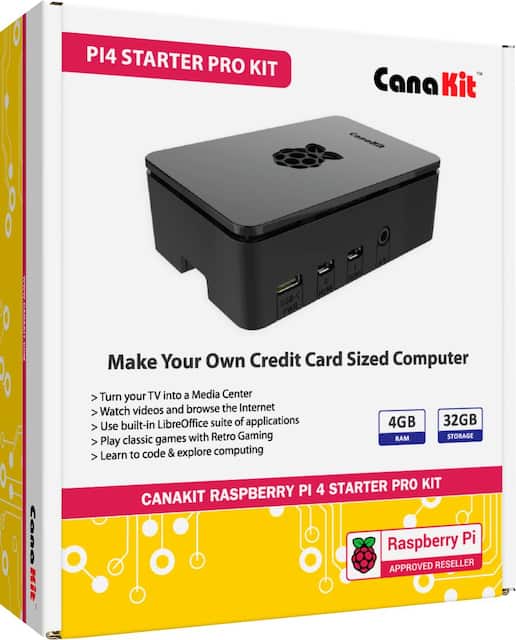
6365737_sd.jpg;maxHeight=640;maxWidth=550


I intend to use the raspberry pi to play NES, SNES, and Sega Genesis games through Retropie. Any suggestions or thoughts on building a raspberry pi would be greatly appreciated.
 
I made one. Don't buy one of those pre loaded gaming cards. I did and it worked for one night then it lost all the data. I was told this exact thing would happen but I bought it anyway. I backed it up before using it but it says it's corrupt. Oddly enough I still have all the games that I played the first night.

Also I had bad luck with several wireless retro controllers. I finally just bought wired snes controllers and they work great.
 
Last edited:
I made one. Don't buy one of those pre loaded gaming cards. I did and it worked for one night then it lost all the data. I was told this exact thing would happen but I bought it anyway. I backed it up before using it but it says it's corrupt. Oddly enough I still have all the games that I played the first night.

Also I had bad luck with several wireless retro controllers. I finally just bought wired snes controllers and they work great.
ROM's aren't an issue for me. Regarding game controllers, I'm gonna use an 8bitdo controller with a usb cable.
 
It's pretty easy from what I remember, I just used this guide, had no problems with it, also set one up for a friend too using the same guide.

https://retropie.org.uk/docs/First-Installation/

That kit looks to be a good one as it comes with heatsinks. You can always get a different case later on if you want something a bit more personal.

I'm gonna get one of these at some point
dce961ca-f1a7-468e-b8a8-7903ac82811c_1000x.jpg
 
ROM's aren't an issue for me. Regarding game controllers, I'm gonna use an 8bitdo controller with a usb cable.
There are images out there that are preconfigured with roms. You just download, drag, and drop on the SD card.

If space isn't an issue, you can pick up something like an old Dell Optiplex for $100 that will blow the Pi out of the water for performance and you'd be able to do much more with it.
 
Heat sinks on CPU and RAM and fan blowing on it uncovered. I'd never use those fancy cases since they keep the heat inside.

Never tried the latest with significantly more RAM. I'd only try it if it improved PSP performance or N64.

I saw there's a way to put the games and data files on a USB flashdrive instead of MicroSD card where the memory card might get corrupted via irregular power downs. I never did see a convenient way to backup or restore game data.
 
Heat sinks on CPU and RAM and fan blowing on it uncovered. I'd never use those fancy cases since they keep the heat inside.

Never tried the latest with significantly more RAM. I'd only try it if it improved PSP performance or N64.

I saw there's a way to put the games and data files on a USB flashdrive instead of MicroSD card where the memory card might get corrupted via irregular power downs. I never did see a convenient way to backup or restore game data.
You're not worried about your board getting dusty?
 
You're not worried about your board getting dusty?

If you put the Pi in a sealed case without vents, you're going to have a bad time.
The Pi 4 doesn't need a fan, a heatsink is good enough. Keep in mind that video is older and they've changed the micro code to improve cooling since then. I use one of these cheap stacked acrylic cases with a heatsink, no fan, and it's runs just fine. If you're going to overclock the snot out of it then a fan would be necessary.

Heat sinks on CPU and RAM and fan blowing on it uncovered. I'd never use those fancy cases since they keep the heat inside.

Never tried the latest with significantly more RAM. I'd only try it if it improved PSP performance or N64.

I saw there's a way to put the games and data files on a USB flashdrive instead of MicroSD card where the memory card might get corrupted via irregular power downs. I never did see a convenient way to backup or restore game data.

There's a couple of ways you can do Pi backups. You can use a tar command and automate it as a Cron job or there's programs that will do it for you, I believe Deja Dupe is the name of one. There's other ways to do it as well but the ones I listed are the easiest.
 
You're not worried about your board getting dusty?
I don't leave it out when not in use. I keep it in one of those Sterilite plastic drawers. You could use a small dust cover or scrap of old t-shirt.

Even with fan and heatsinks, I think I even point a tiny USB fan on it so it doesn't get too hot.

A while back Microsoft Github, I think, had an article about a 3D printed fan mount where it accepts a standard tiny fan pointed at an angle, but I think you could make something similiar out of Lego Technic half beam/lever + a couple of nylon spacers from hardware store.

Also, plugging in the PS3 controller into it sometimes would result in slow down as if not getting enough power or throttling from getting too hot.

Overclocking and adjusting a lot of settings allowed PSP to run playably, but still quite a distance from normal.
 
I don't leave it out when not in use. I keep it in one of those Sterilite plastic drawers. You could use a small dust cover or scrap of old t-shirt.

Even with fan and heatsinks, I think I even point a tiny USB fan on it so it doesn't get too hot.

A while back Microsoft Github, I think, had an article about a 3D printed fan mount where it accepts a standard tiny fan pointed at an angle, but I think you could make something similiar out of Lego Technic half beam/lever + a couple of nylon spacers from hardware store.

Also, plugging in the PS3 controller into it sometimes would result in slow down as if not getting enough power or throttling from getting too hot.

Overclocking and adjusting a lot of settings allowed PSP to run playably, but still quite a distance from normal.

best diy dust filter is pantyhose. People have been using them for years on pc’s.

Which Pi mode do you have? It sounds like you have an inadequate power supply.
 
Last edited:
best diy dust filter is pantyhose. People have been using them for years on pc’s.

Which Pi mode do you have?
If 4 is the latest with a lot more RAM, I have 3.

I never had the Pi connected 24/7 due to lack of HDMI outlets.

I even experimented with a shorter power cable after seeing people say longer cable lowers the actual power that goes to the Pi. I never bought the official power supply brick, but used one as close to whatever 5V 3A whatever it is from Home Depot or would plug it into UPS's USB. I may have tried my iPhone charger which I think had good results.
 
If 4 is the latest with a lot more RAM, I have 3.

I never had the Pi connected 24/7 due to lack of HDMI outlets.

I even experimented with a shorter power cable after seeing people say longer cable lowers the actual power that goes to the Pi. I never bought the official power supply brick, but used one as close to whatever 5V 3A whatever it is from Home Depot or would plug it into UPS's USB. I may have tried my iPhone charger which I think had good results.

The Pi 3 won’t overheat unless you have it in an enclosed space or are using a poor power supply.

The charger you bought from Home Depot probably isn’t doing 5v 3a. Most cheap chargers don’t do their advertised rating.
 
There are images out there that are preconfigured with roms. You just download, drag, and drop on the SD card.

If space isn't an issue, you can pick up something like an old Dell Optiplex for $100 that will blow the Pi out of the water for performance and you'd be able to do much more with it.
True but it uses tons of electricity. There are new single board computers that offer decent price points good graphics for around the price of an optiplex 7050.
 
The Pi 3 won’t overheat unless you have it in an enclosed space or are using a poor power supply.

The charger you bought from Home Depot probably isn’t doing 5v 3a. Most cheap chargers don’t do their advertised rating.
The Home Depot brick said 5V 2.4A. Couldn't find anything else that had specs aside from in terms of watts which I didn't know if translated to what the Pi needed.
 
The Home Depot brick said 5V 2.4A. Couldn't find anything else that had specs aside from in terms of watts which I didn't know if translated to what the Pi needed.

(volts) x (amps) = (watts)
 
I saw a Youtube of ETAPRIME saying for emu, no point in going higher than 2GB or 4GB RAM. I vaguely remember reading something about that before.

I guess if I want better PSP experience, better to wait for more CPU power with a bit more RAM than Pi 3.
 
I saw a Youtube of ETAPRIME saying for emu, no point in going higher than 2GB or 4GB RAM. I vaguely remember reading something about that before.

I guess if I want better PSP experience, better to wait for more CPU power with a bit more RAM than Pi 3.
The Raspberry Pi 4 has a more powerful CPU than the Pi 3. Spawn Wave says here that 2 GB of RAM should be enough for emulation:
 
For someone that's PC retarded theres plenty of guides. Did one myself and it was quite fun, ended up making one for a friend too.
 
It's pretty easy from what I remember, I just used this guide, had no problems with it, also set one up for a friend too using the same guide.

https://retropie.org.uk/docs/First-Installation/

That kit looks to be a good one as it comes with heatsinks. You can always get a different case later on if you want something a bit more personal.

I'm gonna get one of these at some point
dce961ca-f1a7-468e-b8a8-7903ac82811c_1000x.jpg
They have one that uses mini NES carts.

1.png
 
Back
Top